For custom cabinet makers

Design furniture in SketchUp.
Manufacture in minutes.

1-click drawers, doors, legs. Automatic BOM, edge banding, and CNC machine codes. Free forever for personal use.

Works in SketchUp 2022+ · Windows + macOS · No credit card
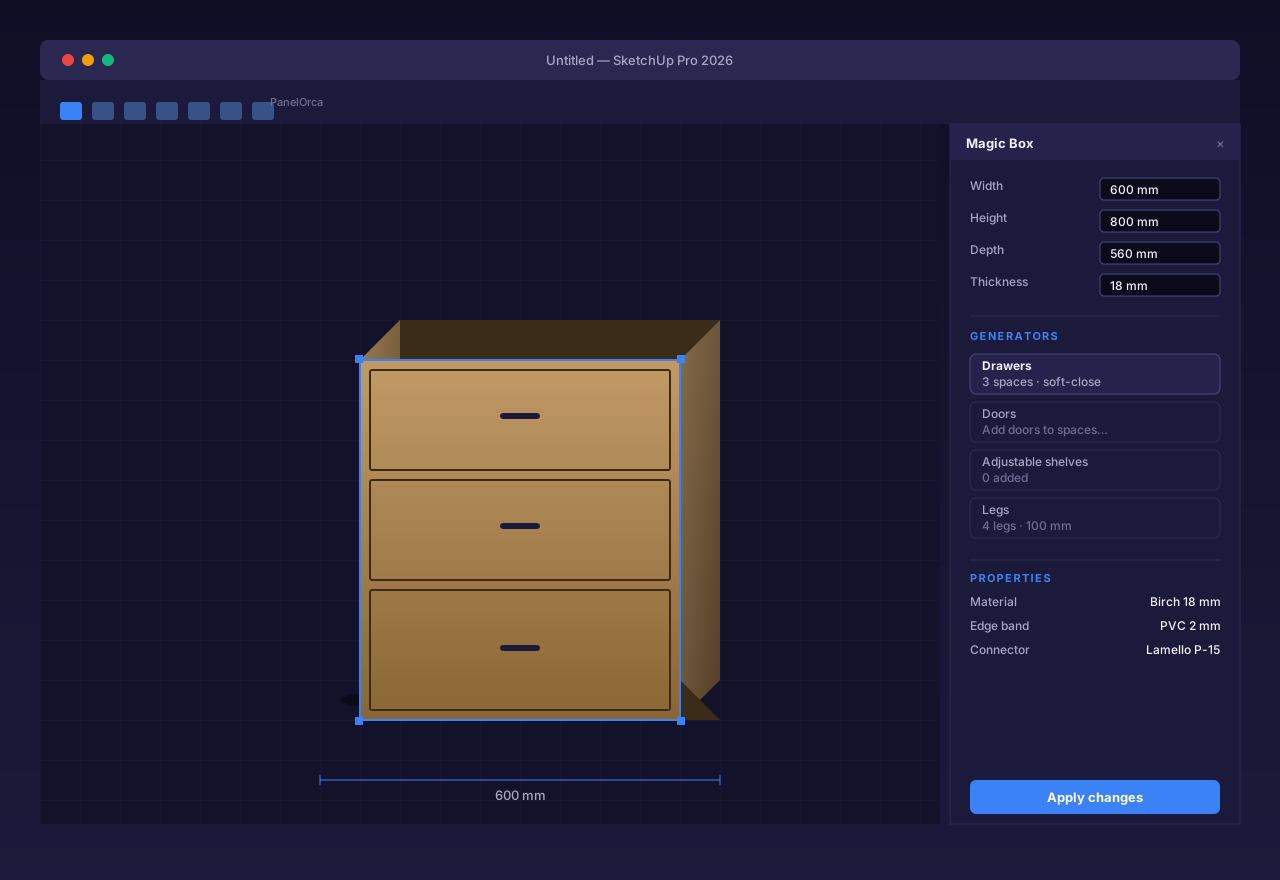
PanelOrca toolbar and Magic Box dialog inside SketchUp
Resize one dimension — drawers, edges, and machine codes follow.
The problem

Custom cabinet orders break when data changes hands too many times.

13
steps
10
roles
4–6
tools

Every handoff is another chance for a missed dimension, wrong BOM, or rework.

SketchUp Spreadsheet PDF G-code

Data re-entered

The same model gets typed up again and again as it crosses tools.

Δ width

BOM changes manually

One dimension changes — every cut list, every edge band, every label has to be updated by hand.

?

No traceability

A missing panel is found at install — by the customer, by the installer, on site.

The solution

One workflow. From sketch to CNC.

Five integrated capabilities, sharing one source of truth — your model.

Design

Parametric cabinets right inside SketchUp.

Generate

1-click drawers, doors, legs, shelves.

Optimize

AI nesting saves up to 14% sheet material.

Label & Export

Designer-built labels and CNC machine codes.

Track

Real-time pool to machine to packing.

Before / After

From hours of busywork to minutes of design.

Process Traditional today's workflow PanelOrca one model, one click
3D Design Manual panel-by-panel placement Magic Box parametric containers
CAD drawings Manual export and cleanup Auto-generated
BOM creation Spreadsheet by hand Auto-generated
Material nesting Manual or third-party tool Built-in AI nesting
Machine codes Hand-coded or 3rd party Auto-export (TPA / CIX / MPR / DXF)
Edge banding spec Mental tracking — error-prone Per-edge automatic resolver
Order tracking Whiteboards, paper, calls QR-coded real-time

Same design quality. Less busywork. Zero spreadsheets.

Capabilities

What's inside PanelOrca.

Six core systems, designed to remove the busywork from custom cabinet making.
SketchUp-native

Designed in SketchUp. The CAD you already use.

  • Native plugin, not a web embed
  • Magic Box parametric containers — resize and the geometry rebuilds itself
  • Per-space drawer / door / shelf settings
  • Built-in chamfer + miter editor
SketchUp window with PanelOrca toolbar and Magic Box dialog
Smart nesting

Pack panels smarter. Buy fewer sheets.

  • PackJS in the browser — instant nesting on every project (free)
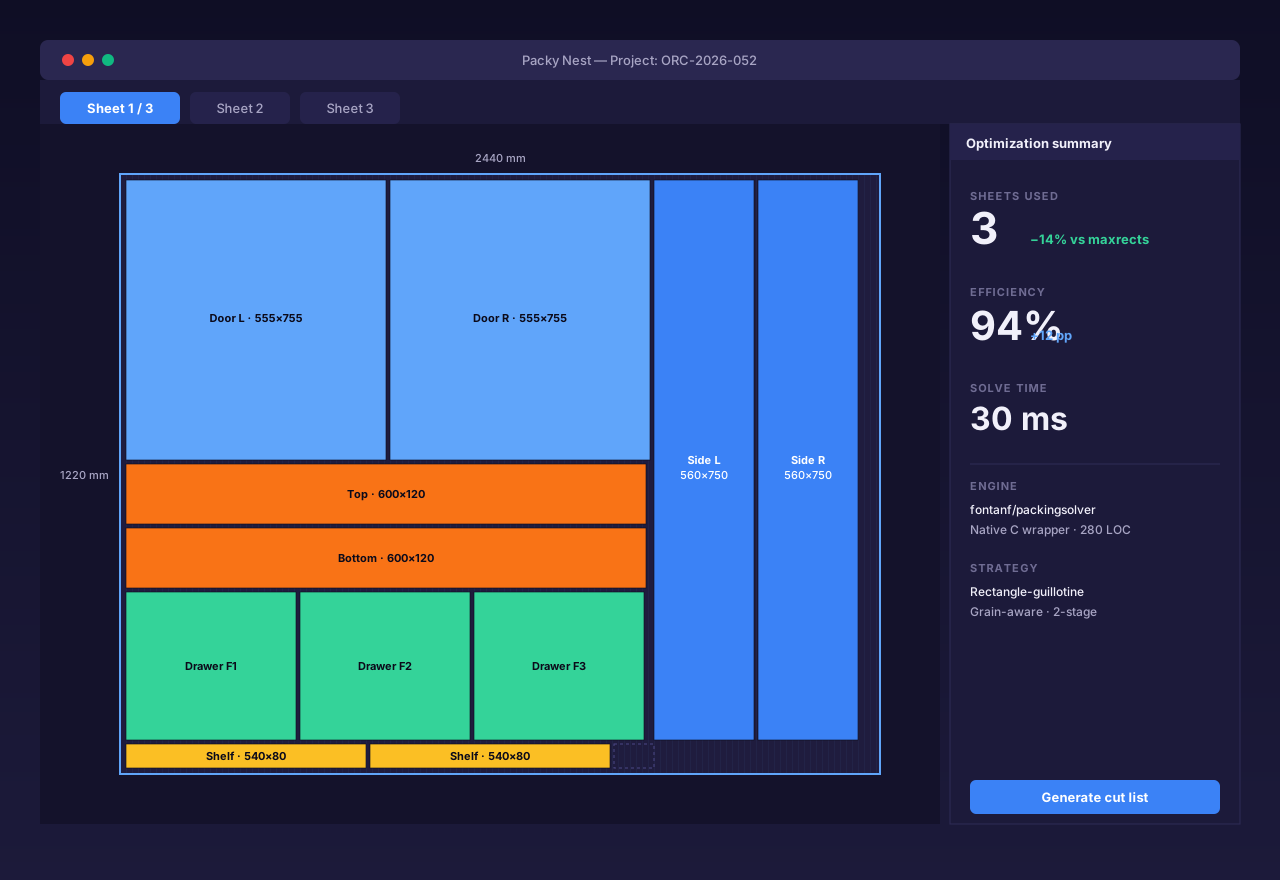
  • Packy native solver upgrade — 30 ms per nest on a 60-panel kitchen, −14% sheets
  • Grain-aware, edge-band aware, with per-side flip detection
  • Multi-layer DXF + per-machine NC export for every sheet
Packy nest dialog showing sheet layout
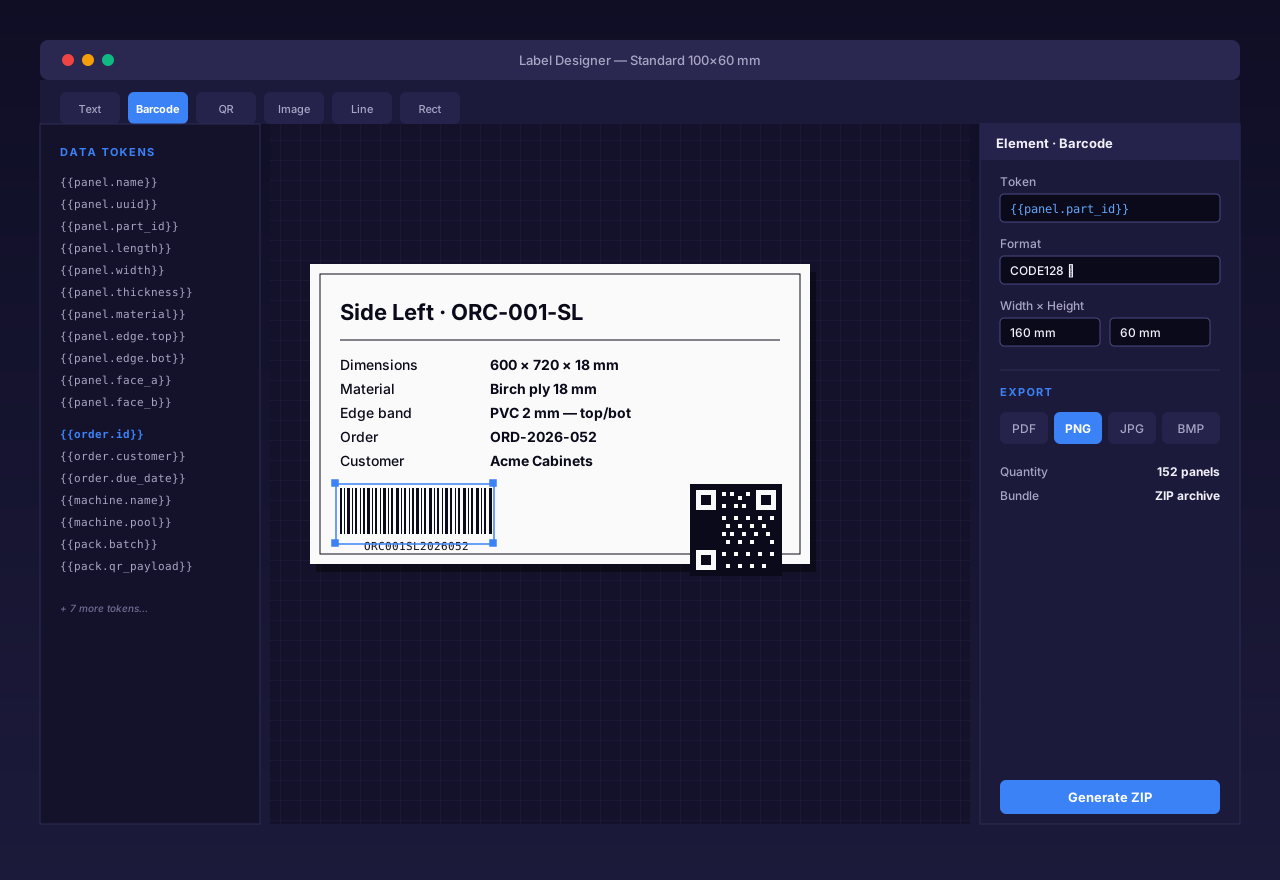
Label Designer

Build labels visually. Print thousands.

  • SVG canvas, 10 element types (text, barcode, QR, image, line, rect, …)
  • 25+ data tokens (panel name, dimensions, material, machine, order, …)
  • 3-tier preset library: System / Palette / Per-order
  • Export ZIP: PDF / PNG / JPG / BMP
Label Designer IDE with sample label preview
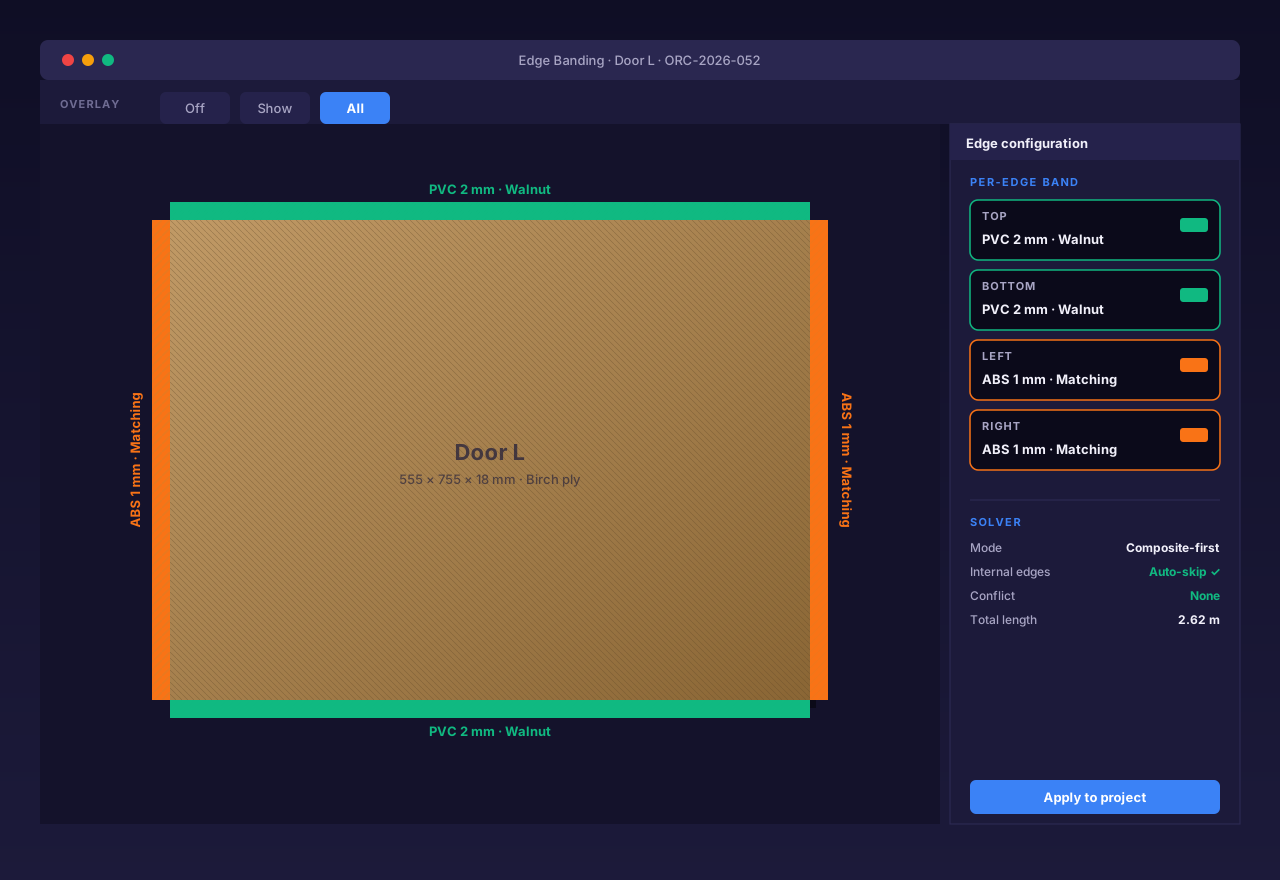
Edge banding

Per-edge decisions. No guesswork.

  • EdgeSolver: composite-first, with fallback rules
  • Visual overlay modes: off / show / all
  • Four sides per panel, each with its own material
  • Auto-skips internal edges (no waste)
Panel with edge band overlay in SketchUp
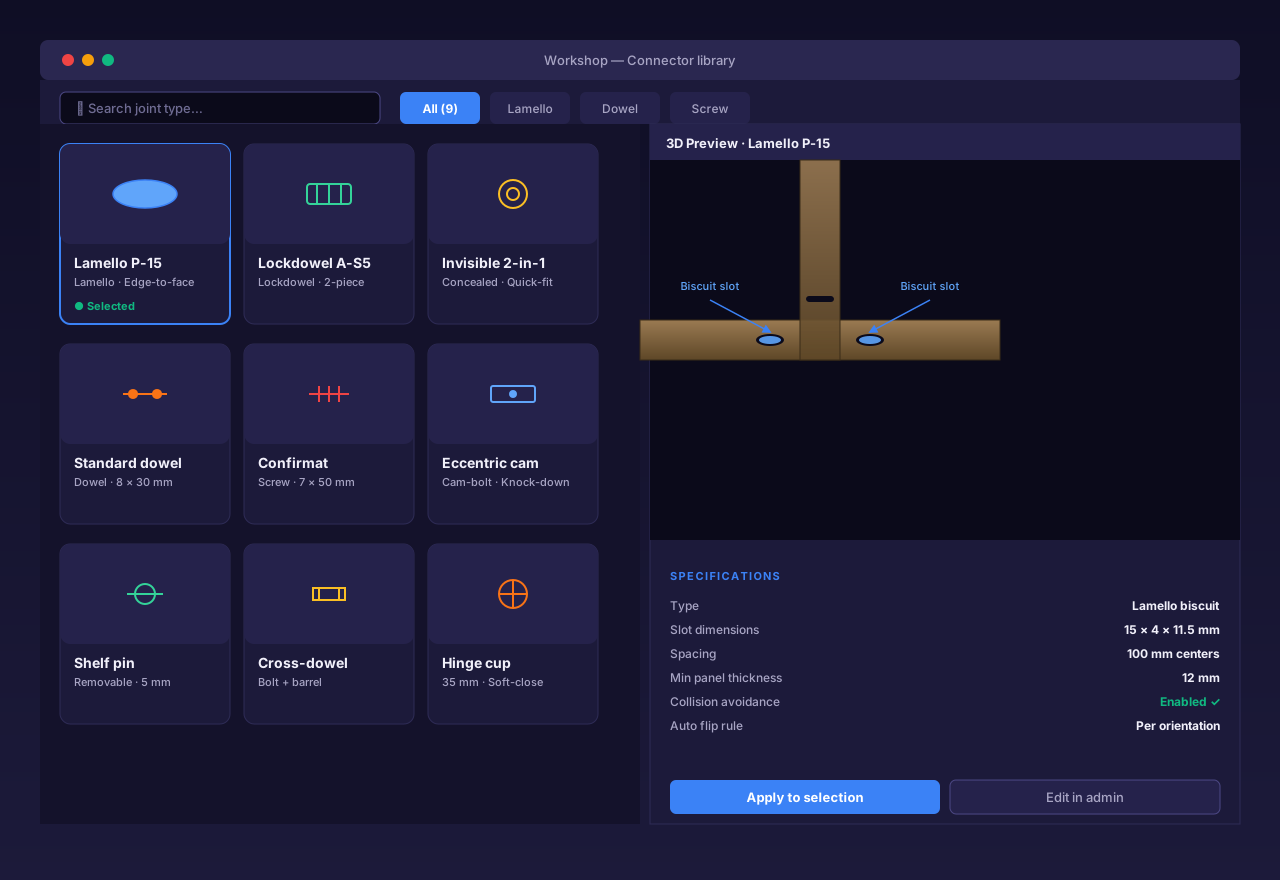
Connectors

Build your connector library — your brands, your rules.

  • 9 joint patterns — face-to-edge, face-to-face, edge-to-edge, groove, hinge, runner, shelf support, shelf pin, pin system
  • 3-tier library: System defaults / Company library / Per-user
  • Auto-placement with collision avoidance + per-orientation flip
  • Drop in any brand — Lamello, Lockdowel, Invisible 2-in-1, dowels, screws
Workshop dialog with connector picker
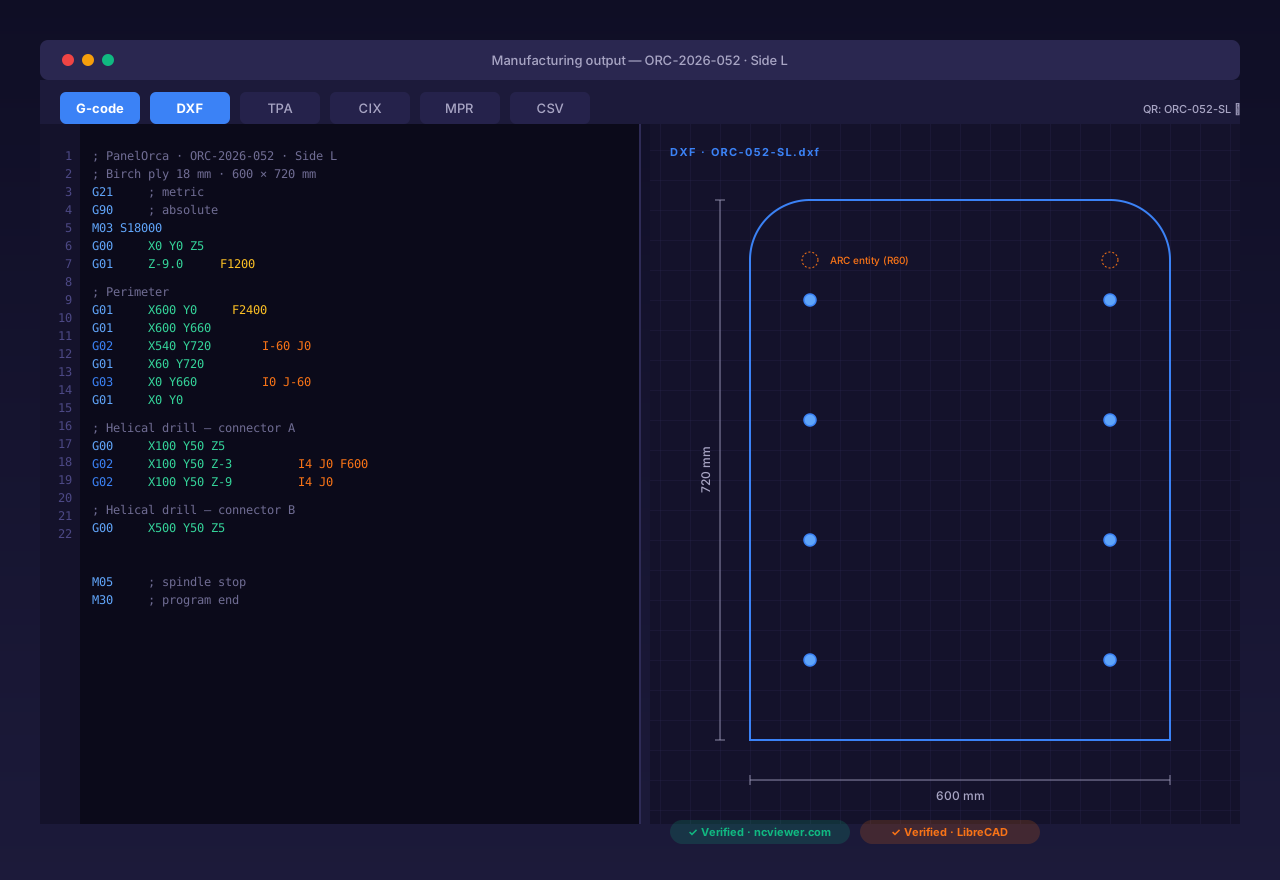
Manufacturing output

G-code, DXF, TPA, CIX, MPR — every machine speaks a language.

  • Mach3-style G-code with G02/G03 helical interpolation for native CNC arcs
  • DXF cut paths with true ARC entities (not polyline approximations)
  • Multi-layer DXF: cut · drill-A · drill-B · groove · pocket — one file per sheet
  • Per-machine post-processor — Biesse (CIX), Homag (MPR), TPA, more in active development
NC viewer next to DXF preview
Measured, not marketed

Numbers we can back.

We only quote what we've benchmarked. No inflated claims.

−14%
Sheet material saved
Real 60-panel kitchen benchmark vs. maxrects packing
130×
Faster material apply
15-panel cabinet: 20 s → 150 ms
12×
Faster cabinet resize
5.1 s → 420 ms — every dimension change rebuilds in under half a second
6
Languages in-app
EN, TH, VI, RU, ID, ZH-CN
How it connects

Same data, every stage.

From the customer to the CNC — one model is the source of truth.

Customer
CRM
Designer
SketchUp + PanelOrca
Cloud
Single source of truth
Factory
In-house · Outsourced
Inside the cloud

Three production modules,
one shared model.

Switch from taking an order to nesting a sheet to packing a finished job without re-entering a single dimension. Each module reads and writes the same data PanelOrca already knows about.

  • One model, three workflows — no spreadsheet handoffs
  • Pre-flight checks block bad orders before production starts
  • QR codes follow every panel from cut to packed
OMS

Order Management

Customer + project orders, commit-to-pool wizard, pre-flight checks

PMS

Production Management

Pools + machine binding, nesting + optimization, per-sheet DXF/NC export

SPS

Sort & Pack

Post-cut sortation, QR-scan job kits, dispatch tracking

Pricing — kept simple

Free forever for personal use.

Use the full design pipeline at no cost. Upgrade later only when you outgrow the free tier.

Free tier

Everything you need to design.

  • Full SketchUp extension
  • Parametric cabinet design (Magic Box)
  • Panel Designer (Node-Vector Path)
  • Cloud sync — up to 3 projects
  • Built-in nesting (PackJS)
  • BOM export
  • Three.js viewer
Upgrade when ready

Production tooling, when you need it.

  • G-code / DXF / Cutlist export upgrade later
  • Label generation upgrade later
  • Packy native nesting upgrade later
  • Multi-user (10+ seats) upgrade later

No prices yet — we're focused on getting the free tier right first.

Try PanelOrca free today.

No credit card. No trial timer. Personal use is free forever.

Built for SketchUp 2022 and newer · Windows + macOS